Every domain name has a past. That past does not always match what the site publishes today. In 2011, SoSoActive .com belonged to a small Dallas media company. It covered music apps, music start-ups, and festivals like SXSW. Today, sosoactive.com operates a general magazine under a different owner. Same name. Two very different sites.
That gap between a domain’s history and its present is the whole story of expired domains. You may hope an old name will bring its links, its trust, and its age to your new startup. Sometimes it does. Often it brings nothing. And since 2024, misuse can count as spam.
Below, you will learn how expired domains move through the domain lifecycle, what Google does with old link value, where its spam rules draw the line, five safe ways to use an old name, a 12-point vetting checklist, and a 90-day launch plan.
Related Stories



Key Takeaways
- Expired domains help only when your new site continues the old topic.
- Google tries to discard old link value when a new owner changes the subject.
- Buying an old name to host unrelated, low-value pages breaks Google’s spam policy.
- Vet history, links, index status, and traffic claims before you bid.
- Third-party traffic numbers are estimates and can collapse fast.
- A fresh domain is often cheaper than a risky old one.
What Counts as an Expired Domain (and When You Can Buy One)
An expired domain is a name its owner failed to renew. It does not become free the next day. It passes through fixed stages first. Knowing those stages tells you when expired domains reach the market, what you may pay, and who you compete with.
The Domain Lifecycle in Plain Terms
For .com, .net, and .org names, the cycle has three holding stages before release.
- Grace period. Your registrar sets the length. It is often about 30 days and can run to 45. Some registrars offer none. The owner can still renew at the normal price.
- Redemption period. This lasts 30 days. The name is deleted from the zone, so the site and email stop working. The owner can still restore it, but must pay a restoration fee in addition to the renewal fee. That fee is often $80 to $150.
- Pending delete. This lasts about 5 days. No one can renew or restore the name. Then it drops, and anyone can register it.
ICANN’s Expired Registration Recovery Policy sets the rules registrars must follow here, including renewal notices and fee disclosure.
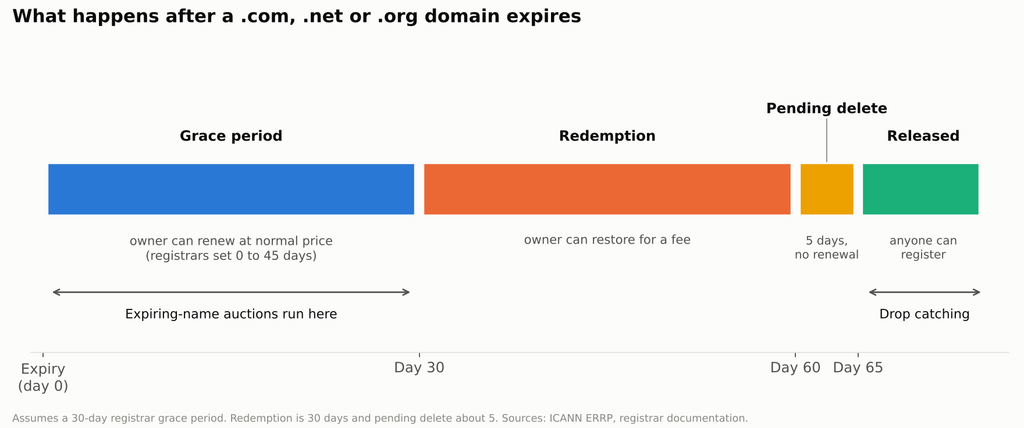
Expired domain lifecycle timeline showing grace, redemption, pending delete and release, with the buying method that fits each stage
Three Ways to Get One
You can get expired domains in three main ways. Each one carries a different price and risk.
Expiring-name auctions
Many registrars auction names during the grace period. You bid before the name ever drops. If the original owner renews in time, your win may be canceled. Read each platform’s terms on this.
Drop catching after release
Specialist services try to register a name the moment it leaves the pending delete state. Popular expired domains attract several catchers. The name then goes to a private auction among them, so the “drop” price is rarely the final price.
Private purchase from a live owner
This is not technically an expired name. But it is often the safest route for a startup. You can ask the owner direct questions. You can get Search Console access. You can confirm the site’s history instead of guessing.
Why Expired Domains Can Still Help a Startup Rank Faster
The real value of expired domains is narrower than sellers claim. It is not “authority.” It is relevance that already exists on the web.
The Real Advantages
- Topical links to useful pages. If trusted sites in your niche still link to pages you can rebuild, those links can matter again.
- Brand mentions and type-in visitors. Some people still type the old name or click old mentions.
- Faster discovery. Google already knows the name, so new pages tend to get crawled sooner than on a brand-new domain.
What Google Actually Does With Old Link Equity
Google has dealt with expired domains for a long time. In 2008, Matt Cutts, then head of Google’s webspam team, said Google tries to reset PageRank and links for expired names when someone new registers them. The aim was not to punish the domain. It was to stop crediting a new owner with links earned by an old one.
John Mueller of Google has explained the same idea in newer terms. When Google sees a new site is unrelated to the old one, the old links apply to the old site, not the new one. He has also said it can take a long time for a domain’s old state to fade before Google treats the site as new.
The core rule: continuity carries value. A new topic on an old name usually means starting from zero, and sometimes from below zero.
This is the part of expired domain SEO that most startups miss. You are not buying authority. You are buying a head start on a topic someone else has already begun. If you change the topic, you throw away the head start you paid for.
Where the Line Sits Under Google’s Spam Policies in 2026
Before you buy expired domains, you need to know what Google treats as abuse. The rules here are written down, and they apply worldwide.
The Expired Domain Abuse Policy
Google added expired domain abuse to its spam policies in March 2024. Its spam policies page defines it as buying an expired name and repurposing it mainly to manipulate rankings with content that gives little or no value to users.
Google’s own examples are blunt. One is affiliate content placed on a site that a government agency once used. Another is commercial medical products sold on a site that a non-profit medical charity once ran.
Google also says it is fine to use an old domain for a new, original site that is built to serve people first. So the policy targets intent and value, not the act of buying an old name.
Allowed vs. Abusive Uses
The difference usually comes down to two questions. Does your site continue what the old one did? And would a past visitor find your content useful? The table below sorts common uses of expired domains by those two tests.
| Likely allowed | Likely abusive |
|---|---|
| Buying a closed competitor’s domain and continuing its topic | Placing unrelated affiliate pages on an old authority name |
| Relaunching a dormant project in the same niche | Redirecting off-topic domains to pass link value |
| Merging a same-niche site with page-level 301 redirects | Publishing mass AI pages on an aged domain |
| Rebuilding useful old resources with updated facts | Copying archived pages word for word to fake continuity |
The 2026 Enforcement Picture
Google has been busy this year. The September 2026 spam update was its fourth in 2026, following the March, June, and August updates. The Search Status Dashboard shows it ran from September 24 to October 8, 2026.
Google has not said what that update targeted. There is no public confirmation that expired domain abuse was a focus. Treat any claim that it was as a guess.
One more change matters if you sell into Europe. From August 30, 2026, Google stopped applying site reputation abuse manual actions to results shown in the European Economic Area. That is a regional change, not a repeal. The policy still applies everywhere else, and it does not affect the expired domain abuse rules.
How Startups Use Expired Domains the Right Way
The five plays below run from lowest risk to highest. Each one keeps the old topic alive, which is the only reason expired domains hold value at all.
Play 1: Acquire a Closed Competitor’s Domain
When a rival in your space shuts down, its domain may still hold links from reviews, partners, and directories in your niche. Those links describe the same problem your product solves.
- Keep the URLs that earn links live, or redirect each to your closest matching page.
- Update the old content and add honest context, such as “this service closed in 2025; here is an alternative.”
- Do not pretend to be the old company. Make the new ownership clear on the About page.
Play 2: Relaunch a Dormant Domain in the Same Niche
Some sites go quiet for years but never change topic. If you plan to cover the same subject, the old links stay relevant.
- Use archived snapshots on the Wayback Machine to see which pages existed.
- Rebuild the most-linked pages with new research, current data, and a named author.
- Rewrite everything. Archived text belongs to its original author, and copied pages add no value.
Play 3: Merge a Relevant Domain With Page-Level 301s
You do not have to run the old site at all. You can redirect it into your own site, page by page.
- Map each old URL to the closest page on your site.
- Never send every URL to your homepage. Google tends to treat mass homepage redirects like soft 404s.
- Follow Google’s guidance on site moves with URL changes so the move is clean.
A 301 redirect expired domain setup only makes sense when both sites share a topic. A redirect from an unrelated name, just to pass link value, is the pattern that Google’s policy describes.
Play 4: Buy a Clean Brandable Name for Its Type-In Value
Sometimes the value is the name itself. A short, memorable domain can earn direct visits and trust in ads and emails. Here the link profile matters less. A clean history matters more, because you do not want old spam tied to your brand.
Play 5: Reclaim Orphaned Links Without Buying the Domain
This option costs the least. When a site dies, its best resources still have links pointing at dead pages.
- Find dead pages in your niche that still earn links.
- Build a better, current version on your own site.
- Contact the sites that link to the dead page and offer yours as a replacement.
You gain the links on your own domain, with no history risk at all.
A 12-Point Checklist to Vet an Expired Domain Before You Buy
Use this list as your domain history check before every bid. One red flag is not always fatal. Several red flags together should end the deal. Score each point as pass, caution, or fail.
History Checks
- Every ownership era. Look at archived snapshots from each period, not just the most recent one.
- Spam phases. Any casino, pharma, adult, or foreign-language spam era is a hard stop.
- Topic drift. A site that jumped between unrelated topics carries mixed signals. You want one steady subject.
- Ownership changes. Many owners in a short time often means the name was flipped and reused.
Link Profile Checks
- Real, topical links. Most links should come from real sites that cover your niche.
- Anchor text. Watch for exact-match money phrases, foreign-language anchors, and unrelated product terms.
- Rebuildable targets. Check whether the most-linked pages are ones you can honestly recreate.
Index and Penalty Checks
- Index status. See whether any pages are still indexed and whether the name ranks for itself.
- Search Console history. After you verify the domain, review its past data. Google has said Search Console data stays with the site, not the user, so a new verified owner can see the old data. This is the closest thing you have to a medical record.
- Leftover removals. A past owner may have filed a URL removal request that still hides the site. Check and cancel it.
Traffic Claims and Third-Party Estimates
- Estimates are not visits. Traffic tools model visits from rankings, volumes, and click rates. They do not count real people.
- Branded inflation. Check whether the “traffic” is mostly people typing the domain name itself. That traffic rarely survives a change of owner.
Point 12 is easy to skip, and it can cost you. Voozon.com shows why. It is a multi-topic site that publishes articles and sells guest post spots. It has been online since 2019 and grew fast in 2026. Between 14 and 24 September 2026, its estimated Google traffic fell by about 97.7%. Its earlier estimate also appeared to rely heavily on people typing the domain name itself, rather than on articles ranking for real topics.
There are three lessons here for you as a startup.
- A rising chart does not prove lasting trust. Fast growth in a tool’s estimate can reverse in days.
- Do not assume a single cause. Most of that drop window falls before the September 24 spam update began. Industry trackers did report ranking swings from around September 23. A drop near an update is not proof the update caused it.
- Rented links can vanish too. If your link plan leans on paid placements from sites like this, their losses can become yours.
To be clear, there is no public evidence that Voozon.com used expired domains or received a manual penalty. The point is about how fragile traffic numbers are, on any site you buy from or into.
The timeline below places that drop window next to Google’s confirmed changes in late 2026.
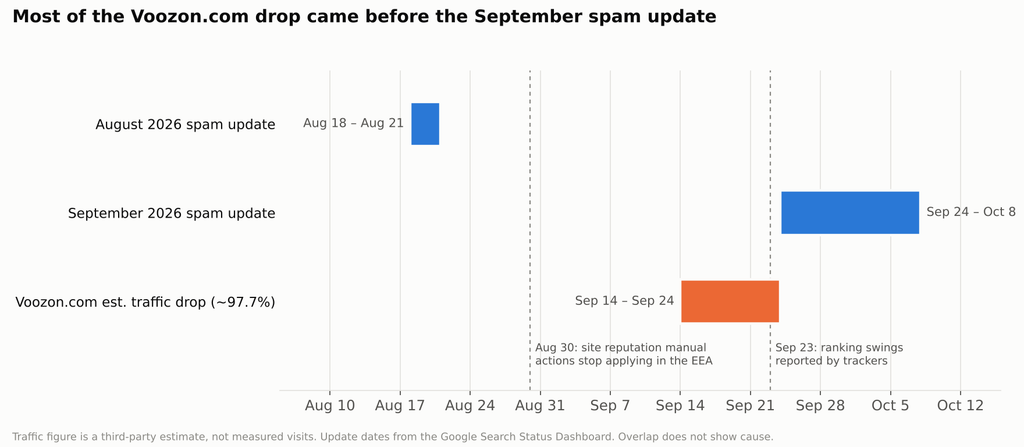
Timeline of Google’s August to October 2026 changes with the Voozon.com estimated traffic drop window from 14 to 24 September
Your First 90 Days on an Expired Domain
The order of your launch matters on expired domains. If you publish new pages before you clean up the old state, you end up mixing two signals and learning nothing.
Days 1–30: Clean Up and Rebuild
- Verify the domain in Search Console and read its full history.
- Cancel any leftover removal requests.
- Rebuild or redirect the 10 to 20 URLs with the most links first.
- Publish clear About, contact, and ownership pages.
Days 31–60: Add Original Content
- Publish what the old site never covered, using your product data or customer insight.
- Put a real, named author on every article, with a short bio and credentials.
- Link new pages to the rebuilt ones so the topic stays connected.
Days 61–90: Measure and Decide
- Track whether the rebuilt URLs regain rankings for their old topics.
- Check whether the domain ranks for its own name. If it does not, Google may still be treating it as its old self.
- Set a stop rule before you start. For example: if the brand name and core pages show no movement by day 90, plan a move to a fresh domain.
When a Fresh Domain Is the Smarter Bet
Expired domains are not always the faster path. Pick a new domain when any of these apply.
- Your product has nothing in common with any past topic in the name.
- Spam appears at any point in the domain’s history.
- The price exceeds the cost of six months of original content and digital PR.
- You cannot rebuild the pages that hold the useful links.
A clean new domain with strong content often catches up within a year. A tainted old one can stall for longer than that.
From the Audit Desk: Patterns Worth Knowing
After years of reviewing expired domains for clients, a few SEO patterns keep recurring.
- The best buys are boring. A small niche site that covered one topic for years beats a high-score domain with a messy past.
- Price follows metrics, not value. Sellers price on authority scores. You should price on how many linked pages you can honestly rebuild.
- Sellers rarely offer Search Console access. When they refuse, treat that as caution, not as normal.
- Startups underestimate the rebuild. Budget writing time for the old pages, not just the purchase.
Frequently Asked Questions
Is buying expired domains against Google’s rules?
No. Buying an old name is allowed. Google’s policy targets buying one mainly to manipulate rankings with low-value content. Using it for a new, original site built for people is fine.
Do expired domains still pass link value in 2026?
Sometimes. Google tries to discard old link value when the new site is unrelated. Links tend to retain more value when your site continues with the same topic and the linked pages still exist.
How long does a new site on an expired domain take to rank?
There is no fixed time. Google has said shaking off a domain’s old state can take a long time. A same-topic relaunch often moves faster than an unrelated one, which may not benefit at all.
Should a startup 301 redirect an expired domain to its main site?
Only when both sites cover the same topic. Map each old URL to its closest match. Never send everything to the homepage.
How can you check a domain’s past ownership and content?
A domain history check uses three sources. Use archived snapshots on the Wayback Machine for content, a backlink tool for link history, and Search Console for past performance data after verification.
Did the September 2026 spam update target expired domains?
Google has not said. The update ran from September 24 to October 8, 2026, and Google did not name a target. Any claim about its focus is a guess.
CLICK HERE FOR MORE BLOG POSTS

Emma Clarke is a content writer at Gaukurinn.is, specializing in celebrity news, pop culture, movies, and music. With a strong focus on accuracy and trending topics, she creates engaging and well-researched articles that keep readers informed and entertained.
Emma follows trusted sources and editorial standards to ensure content is reliable, relevant, and up to date. Her goal is to deliver clear, valuable information that readers can trust.